RailFlow
06:00
Running
0
Held
0
Closed
0
Decisions
0

A JavaScript port of RailFlow's routing rules, running in this page.

  • Followed route
  • Busy
  • Over capacity
  • Closed
  • Dijkstra's search

Delhi – Lucknow · 36 stations · 42 sections

Traffic control for 500 km of railway.

RailFlow simulates the corridor one minute at a time, prices every section by how busy it is, and reroutes trains around closures before a dispatcher has to. The network behind this text is the real one, and so is the routing.

Scroll to take it apart · drag to turn it
01 Two maps

One railway, drawn two ways.

Every station in the dataset has two positions: where it really is, and where it sits on the hand-drawn control-room diagram. RailFlow keeps both and moves between them.

The change doesn't cross-fade. It starts at Delhi and travels down the line, the way a state change moves through a real railway. Same geometry, same draw call; one number differs.

02 The price of a section

Routing on minutes, not kilometres.

Each bar is one section's expected running time right now: its length over its line speed, raised as trains crowd onto it. Dijkstra searches over these prices, recomputed against live occupancy. That's what turns map routing into traffic control.

minutes = km ÷ line speed × 60 × m

m = 1                    load ≤ 0.7
m = 1 + (load − 0.7)×1.4  load ≤ 1
m = 2 × load             load > 1

03 A closure

Close Moradabad–Rampur. Watch the search.

Each ring is a station Dijkstra settled, drawn in the exact order the algorithm settled it, with the minutes it assigned. The green line is the route it returned.

Any train whose path crossed the closure gets rerouted, but only if the new route is projected to be faster. If the controller can't show an improvement, it does nothing.


04 Down to the rail

A train is a length, not a dot.

Following a train, live. Each vehicle is placed by arc length along the alignment, so a formation bends through a curve coach by coach instead of sliding along as one block.

Trains lean into curves by v²/r, capped at the six degrees real track allows. The console runs the same motion against the backend's stream, at frame rate between one-second snapshots.


05 Your turn

Close any section.

Click a section to close it; click it again to reopen it. The controller reroutes whoever needs it, once per simulated minute, highest priority first. Drag to move around, shift-drag to rotate.

Controller log

    Results

    Measured against no control, through the same loop.

    Six scenarios, five runs each, 600 simulated minutes per run. The agent and a no-agent baseline run through the identical tick loop, so both share the same movement physics. Thirty days of real running history for two services on this corridor set the baseline.

    59.7%
    less total delay than running with no controller: 1,951 against 4,842 train-minutes.
    100% vs 0%
    of trains on time in the line-closure scenario, with and without the controller.
    44 / 246
    automated actions, against 246 congestion events that needed a dispatcher without it (an 82.1% reduction).
    20 min
    real average destination delay on this corridor, with 76.7% on time (etrain.info, May–June 2026).
    Total delay by scenario, train-minutes
    ScenarioNo controllerRailFlow controller
    Peak hour, 8 mixed trains 2,250 1,353
    Closure and reroute 1,994 0
    Shatabdi, congested 598 598
    Three uncongested runs 0 0

    Not every number moves the right way. In the peak-hour scenario the controller cut total delay by 40%, but on-time arrivals fell from 38% to 25%: it lets a few trains run late to take a lot of delay out of the whole system. The benchmark reports that result rather than leaving it out. Reproduce any of this with python -m backend.benchmark.

    How it's built

    One loop, one lock, one minute at a time.

    1. Tick

      An asyncio task advances the world by one simulated minute. Everything lives in memory, behind a single lock.

    2. Move

      The integrator spends time, not distance. A train that reaches a station mid-tick carries the leftover time onto the next section, at that section's speed.

    3. Occupancy

      Counted once per tick. It sets each train's speed and each section's price.

    4. Decide

      At most one controller decision per tick: reroute, hold or stop. It must be valid, then projected to help.

    5. Broadcast

      A snapshot goes out over WebSocket. The console dead-reckons between snapshots, so motion is continuous at frame rate.

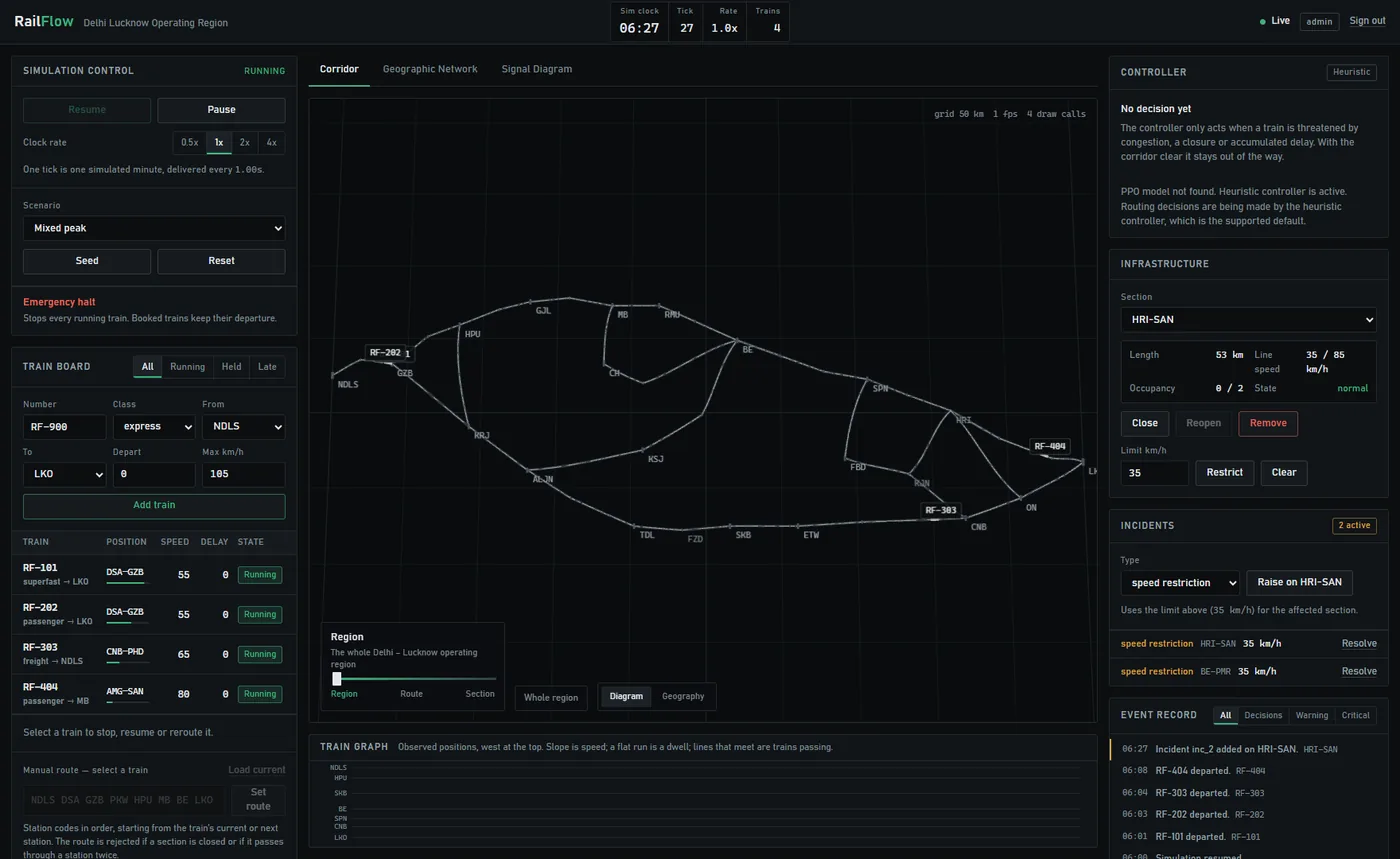
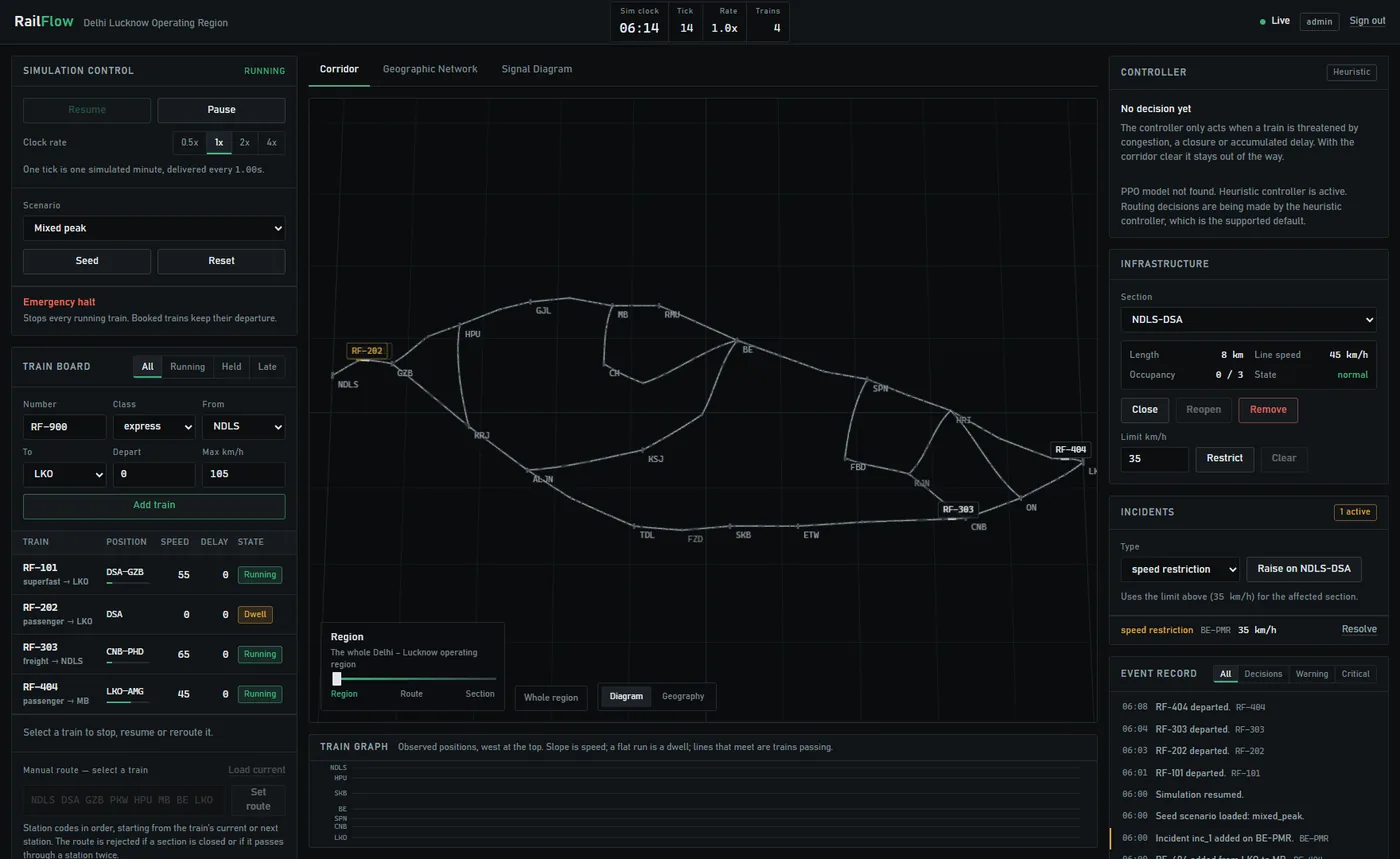
    The RailFlow console: train board on the left, the 3D corridor view in the centre, the time–distance train graph below.
    The console. Train board, the WebGL corridor view, and a time–distance train graph built from observed history.
    The console under congestion, with sections drawn amber and red.
    Under load: section state is the only colour on screen.
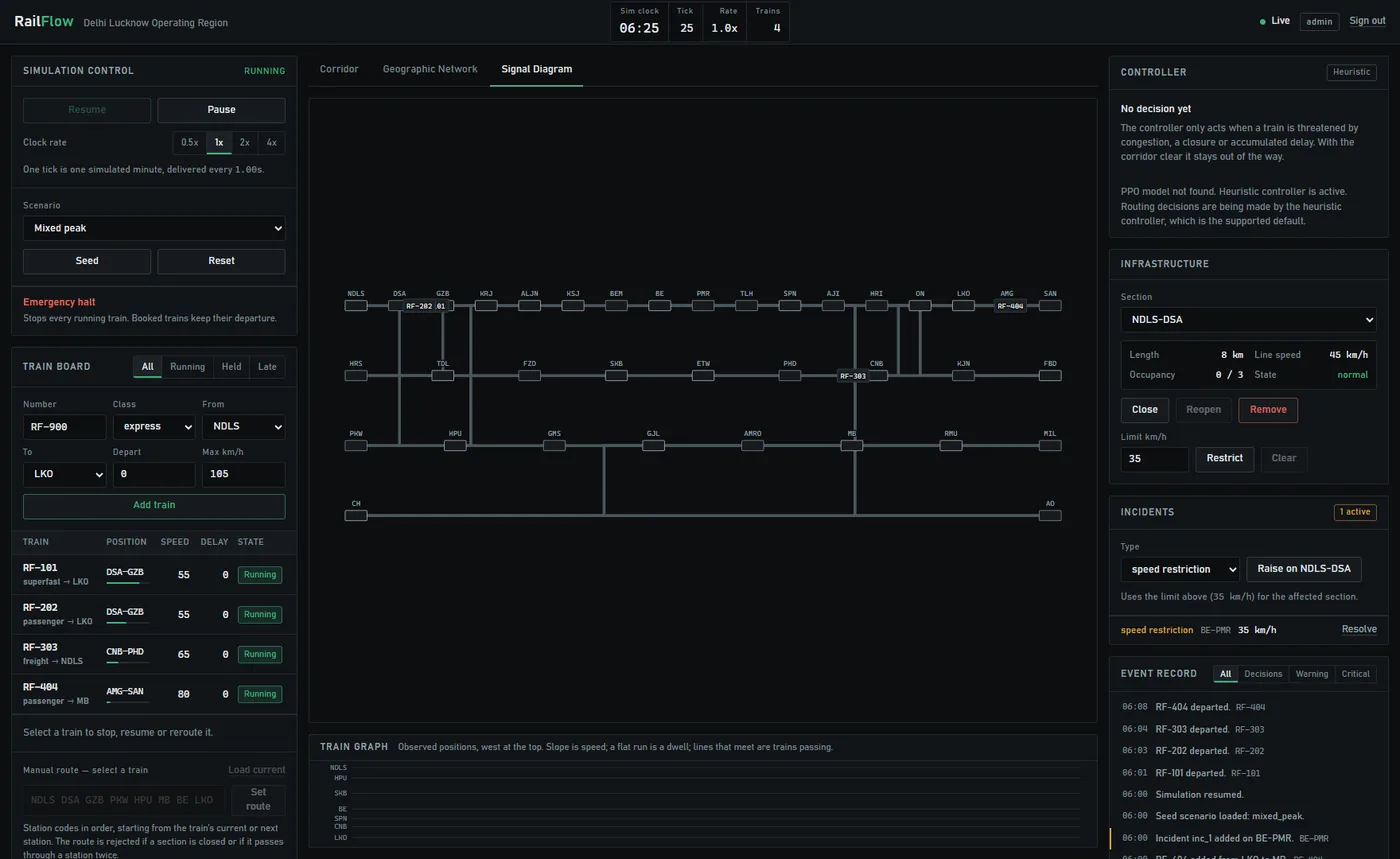
    The signal diagram view, with lanes derived from the graph.
    Signal diagram: lanes derived from the graph itself, not hardcoded.

    Code

    The two functions that matter.

    Verbatim from the repository. The first is why routing responds to traffic; the second is why the controller can't make things worse.

    backend/graph.py
    def dynamic_weight(self, edge, trains_on_edge=0):
        if edge.blocked:
            return math.inf
    
        base_minutes = edge.distance_km / edge.effective_speed_limit * 60.0
        load_ratio = trains_on_edge / max(1, edge.capacity)
        if load_ratio <= 0.7:
            congestion_multiplier = 1.0
        elif load_ratio <= 1.0:
            congestion_multiplier = 1.0 + (load_ratio - 0.7) * 1.4
        else:
            congestion_multiplier = load_ratio * 2.0
        return base_minutes * congestion_multiplier
    backend/agent.py
    def safe_decision(self, graph, trains, occupancy, tick):
        # ... choose a decision (heuristic; PPO falls back to it) ...
        if decision is None:
            return None
        decision.source = source
        if not self._valid(decision):
            return None
        if not self._beneficial(decision):
            return None
        return decision
    
    def _beneficial(self, decision):
        if decision.decision == "reroute":
            return decision.delay_after < decision.delay_before
        if decision.decision in {"hold", "stop"}:
            return decision.reason in {"route_unavailable", "capacity_relief"}
        return True

    On the reinforcement learning

    What exists, and what doesn't.

    RailFlow ships a Gymnasium environment over the live simulation, a PPO training entry point on Stable-Baselines3, and the safety gate above, which would contain a bad policy.

    It does not ship a trained policy that makes decisions. The PPO path hands off to the rule-based controller, and every number on this page comes from that controller. The documentation explains why the current formulation wouldn't learn, and what it would take to fix it.

    Simulation
    Python, FastAPI, asyncio, Pydantic
    Transport
    WebSocket snapshots, REST for control, role-based sign-in
    Routing
    Dijkstra on a binary heap over a congestion-weighted cost
    Console
    React 18, Vite, Three.js with custom shaders and instancing
    Learning
    Gymnasium environment, Stable-Baselines3 PPO entry point
    Verification
    38 geometry and physics tests, 57 simulation invariant checks
    Delivery
    One Docker container serving console, API and stream from one origin

    The console is the real thing.

    Run the backend, open the console, seed a scenario, and dispatch the corridor yourself.

    pip install -r backend/requirements.txt
    python -m uvicorn backend.main:app
    cd frontend && npm install && npm run dev